
An example built with Atelier
Build an audit tracker for client follow-up
Accessibility auditors need to follow up their recommendations and prepare client updates: which corrections matter most, what is still open and what has been resolved.
You can build a SaaS for that workflow by adapting Atelier with a coding agent. Here, Atelier’s projects become audits with recommendations, priorities and progress. The audit tracker is a separate customization of Atelier; its added features are not included in the source code you buy.
Your demo data lasts for the 30-minute session shared with Atelier.
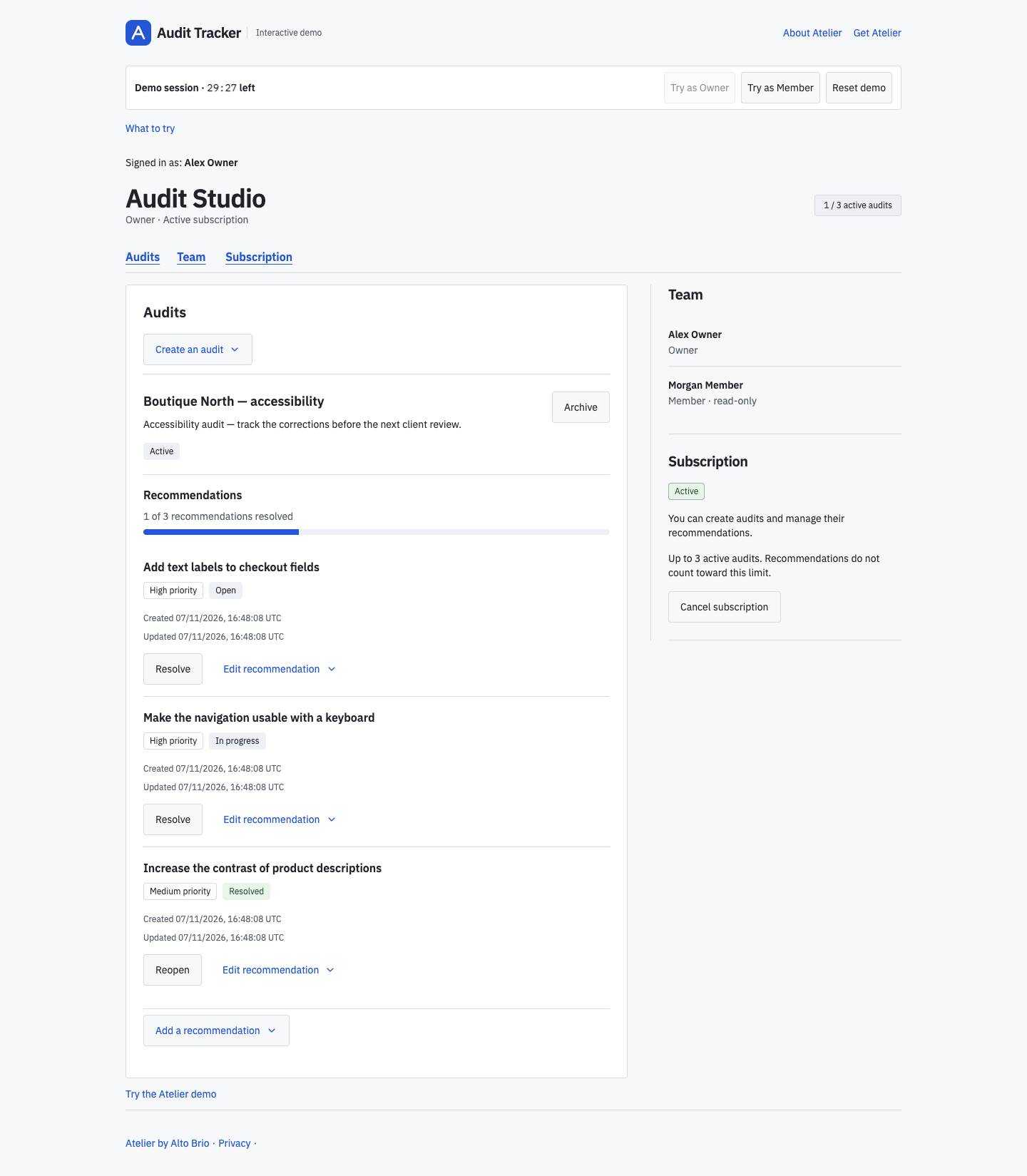
Track recommendations and progress
Open “Boutique North — accessibility”. Checkout fields still need text labels, work on keyboard navigation is in progress, and the contrast issue in the product description is marked as resolved. You can see the priorities and the progress: “1 of 3 recommendations resolved”.
Add a recommendation, adjust its title or priority, then resolve it when appropriate. If it needs attention again, reopen it. The application calculates progress from those saved statuses.
This first version is a workspace for the audit team. Auditors prepare and send client updates themselves.
Give your agent the business brief
Use this brief as a starting point with the supplied kit-feature workflow:
Build a shared workspace for a team carrying out accessibility audits
for clients. They need to track the corrections after each audit.

Adapt Atelier to keep each audit and its recommendations together.
Each recommendation needs a title, Low/Medium/High priority and
Open/In progress/Resolved status. Let the owner add and edit them,
resolve them and reopen them. Show each audit’s progress as resolved
recommendations out of the total.

Keep members read-only and preserve team isolation, active-plan checks,
archiving and the three-active-audit quota. Use the supplied
kit-feature workflow.
Adapt the application and check the result
The extension reuses Atelier’s projects as audits, along with its accounts, teams and subscription access. It adds recommendation screens backed by database storage and HTTP routes. Recommendations do not count toward the active-audit limit.
Use the customization guide with the supplied AGENTS.md and kit-feature workflow to implement your version. Review the changes and use the verification workflow to check:
- Saved recommendations and calculated progress after a reload, including after a recommendation is resolved or reopened and when an audit has no recommendations.
- Atelier’s access rules and quota still apply to the adapted workflow.
- When account erasure removes an audit, it removes that audit’s recommendations too.
For a smaller first exercise, follow the project due-date walkthrough.
Explore Atelier’s architecture · Price & licence · Back to Atelier